Introduction
High humidity levels in your bathroom can lead to a fertile breeding ground for microbes like bacteria, mold and mildew. This can trigger allergic or other respiratory problem. Additionally, humidity can also significantly reduce the lifespan of the
materials used in the bathroom.
In my house I have a air handling unit with rotor exchanger (
Flexit SL4 R) which sucks air from the bathroom (among other rooms) and blows fresh air into the house.
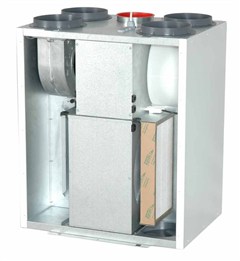 |
| Flexit SL4 R air handling unit (image from Flexit.com) | | |
|
|
However, in order to make this unit efficiently eliminate
excess moisture from the bathroom when e.g., taking a shower, I need to adjust the fan speed to its maximum before going into the shower. Since there is some manual labor involved in pushing the button, it is often forgotten, and hence, the bathroom is not proper ventilated.
The obvious solution to this problem would be to control the air handling unit with a humidity sensor placed in the bathroom. There are two problems with this approach:
- Setting the thresholds for increasing and lowering the fan speed is very difficult since the relative humidity can vary a lot during the year. I.e., when it is very moist, the fan might stay on continuously without being able to reduce the humidity in the bathroom.
- The optimal place for the sensor would be in the roof, which is very visible.
A temperature-based approach
So I thought, what is the root cause of humidity in the bathroom?: Well, it is hot water. Hence, I did a test by measuring the temperature of the hot water going through the pipes into the bathroom while taking a shower. At the same time, I also measured the humidity in the bathroom.
 |
Humidity (in %) in the bathroom and water pipe temperature (in C) while taking a shower (the shower lasted from minute 5-15 in the figure)
|
Not surprisingly, there is a correlation between the temperature of the water into the bathroom and the humidity in the bathroom. The next step is to construct a device that measures the temperature and communicates with the Flexit air handling unit. This will let the Flexit unit increase the fan speed whenever a hot shower is taking place.
.JPG) |
| Temperature sensor on the hot water pipe |
The Arduino-build
Since I wanted a solution with no visible cables or boxes, I decides to go wireless. Luckily, my local DIY-shop (
Clas Ohlson), has a
wireless 433Mhz temperature sensor (36-1797) which costs close to nothing.
In addition I bought a 433Mhz receiver from
Deal Extreme. It is a peculiar unit since it has a lot of pins I do not understand whats for and as typical for Deal Extreme is does not ship with any sort of documentation. Nevertheless, all I needed was VCC, GND and DATA. The latter connection does not come with a soldered pin and I really do not know why. (Typical Deal Extreme confusion). However, it is straightforward to see that the receiver and the data-pin works by connecting it to a scope.
Based on
this guide (which is again based on
this guide) it was easy to receive sensible information from the temperature sensor via 433Mhz on the Arduino
I decided to use a Arduino Nano (ehrmm... clone) on this build. The Nano from Deal Extreme does not come with a bootloader (so it can hardly be called an Arduino at all). I managed to bootload the Nano from an Arduino Mega using
this guide from sysexit. Thank you for that.
 |
| 433Mhz Flexit Fan control using an Arduino Nano |
Back to my build. Once sorting out the protocol for the temperature sensor it is actually a super simple build. The Flexit air handling unit sets the fan speed to the maximum value when Pin 14 and 16 on J5 are connected. The purpose of this is to let e.g., a kitchen cooker hood or a C02 sensor control the fan in a simple way.
I used an 5V Omron relay to connect these two pins. An opto-isolator would have been more suitable since there is no current going, but I did not have any opto-isolator laying around the day I decided to build this circuit. You know how it is. A digital pin on the Arduino drives the relay via a 2N2222 transistor.
In addition I added a LED and a test button. The circuit is so simple that you can probably figure it out from the above picture.
The verdict
So how does the system work in practical life?
.JPG) |
| Flexit SL4 R, with wireless connection. Notice the iPhone 5V charger powering the Arduino |
The system has been running flawlessly for two weeks now. The fan speed increases whenever the shower is used and stays on for about 20 minutes. I now have far less humidity in the bathroom. The nice thing about the system is that there are no visible wires since the transmitter is installed inside a water distribution cabinet (as seen above) and the receiver is installed in the same cabinet as the ventilation system. The receiver is powered by a iPhone 5V USB charger so I do not have to think about battery changes.
Future work
- There is of course the possibility to measure humidity in the bathroom by using an additional wireless ESIC sensor. This requires only a couple of additional code lines on the Arduino. I might use one in the future, but for now I am satisfied by my water-pipe-temperature-based moisture exhaust system.
- I have my 3D-printer placed in a small room that has exhaust ventilation via the same Flexit device. In order to reduce the amount of fumes and nano-particles in the room, I always manually set the Flexit to the maximum when the printer is running. This is a very important matter according to a recent article. It would have been nice if the fan could do this automatically whenever the printer is running. I envision a future project here, using a 433Mhz transmitter connected to the Melzi board on the printer. To be continued...


.JPG)


.JPG)